
The PNB HRMS login portal is the official Human Resource Management System platform used by Punjab National Bank (PNB) to provide employees and retired staff with online access to HR services like payslips, leave management, pension details, attendance records, personal profile updates, and more. Known as PNB Parivar, this digital system replaces manual HR processes and makes HR-related tasks simple, transparent, and accessible from anywhere — especially after the migration to the secure “.bank.in” domain.
👉 Official PNB HRMS Portal:
🔗 https://hrms.pnb.bank.in/
📌 What Is PNB HRMS?
PNB HRMS (Human Resource Management System), also called PNB Parivar, is an integrated web-based platform designed for:
✔ Active PNB employees
✔ Retired employees & pensioners
✔ HR administrators
It centralises various HR functions such as payroll processing, leave and attendance management, pension slips, employee records, performance data, and internal notices — all under one secure system.
The system was implemented to streamline HR operations, reduce paperwork, and empower employees with online self-service access, eliminating long waits at HR counters.
🔐 How to Log In to PNB HRMS – Step by Step
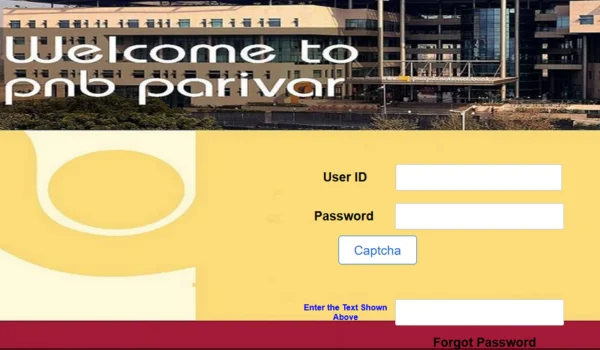
Accessing your PNB HRMS account is simple if you have valid credentials issued by PNB’s HR department. Here’s how:
- Open the Official HRMS Portal
➡ Visit: https://hrms.pnb.bank.in/
This is the official gateway to PNB Parivar HRMS, hosting login links and latest HR notices.
- Click on HRMS Login
On the homepage, you will see a link/button like “Click here to login in to HRMS” — this redirects you to the secure login page for employees and retirees.
- Enter Login Credentials
You will be prompted for:
✔ User ID (often your Employee ID or assigned HRMS ID)
✔ Password
✔ Captcha/OTP (if enabled)
➡ After entering the details correctly, click Login to open your HRMS dashboard.
💡 First-time users: If you haven’t logged in before, contact your HR/Branch Manager to ensure your account is activated. The HR team typically issues your initial username and temporary password.
🧑💼 What You Can Do After Logging In
Once logged in, the PNB HRMS dashboard lets you access a wide range of HR services:
🔹 Payroll & Payslips
✔ View and download monthly salary slips
✔ Download Form-16 for income tax filing
✔ Track & verify deductions and allowances
PNB HRMS centralises payroll data for easy access and record keeping.
🔹 Leave & Attendance Management
✔ Apply for different types of leave
✔ Check leave balance and approval status
✔ View attendance records online without paperwork.
🔹 Pension Details (for Retirees)
Retired employees can access pension slips, arrears, and benefit details through the same portal using their credentials.
🔹 Employee Profile & Personal Information
Employees can view and update their:
✔ Contact details
✔ Bank accounts and PF information
✔ Emergency contacts
✔ Job history and service records.
🔹 Performance & HR Notices
✔ Track performance appraisals
✔ Access internal HR circulars and updates
✔ View transfer & posting orders, exam results, and HR notifications.
📱 Mobile Access — PNB Parivar 2.0
In addition to the web portal, PNB offers PNB Parivar 2.0 — a mobile application designed to bring key HR services to your smartphone. Through this app you can:
✔ Log in using OTP or MPIN
✔ Access salary/pension slips
✔ Apply for leave
✔ Monitor attendance
✔ View internal notices and HR new
✳️ Note: MPIN login can be set up for easier future access.
⚠️ Common Login Issues & How to Fix Them
Even with the best systems, users sometimes face challenges. Here’s how to troubleshoot common problems:
❌ Can’t Login?
✔ Ensure you are on https://hrms.pnb.bank.in — avoid unofficial or imitation URLs.
✔ Double-check User ID and password.
✔ If issues persist, clear your browser cache and try again or use Chrome/Firefox
❌ Forgot Password
✔ Click the Forgot Password link (if available).
✔ Follow the steps to reset via OTP or HR support.
✔ Otherwise, contact your HR/IT support team.
❌ Account Locked
Repeated failed login attempts may lock your account temporarily.
🔹 Wait a few minutes and try again.
🔹 Contact HR for immediate unlocking.
📌 Why PNB HRMS Is Important
The HRMS portal brings significant value to both PNB employees and retirees:
🕒 Time & Effort Savings
No need to visit HR offices for routine services — everything is accessible online.
📄 Centralised HR Data
All your salary, leave, attendance, and personal data are in one secure place.
🔐 Secure & Transparent
Role-based access keeps your data safe and gives clear visibility into payroll and HR processes.
🛡️ Security & Best Practices
To protect your PNB HRMS login credentials:
✔ Always verify the URL starts with https://.
✔ Use a strong, unique password.
✔ Keep your registered mobile/email updated.
✔ Log out after each session.
✔ Avoid public or shared devices.
📝 Conclusion
PNB HRMS login via the HRMS Parivar portal is a powerful tool that modernises HR services for Punjab National Bank staff and pensioners. From viewing payslips and leave records to managing personal details and performance data, the portal ensures efficiency, transparency, and convenience. Whether using the web portal or mobile app, PNB employees can now stay connected with HR services securely and effortlessly.