
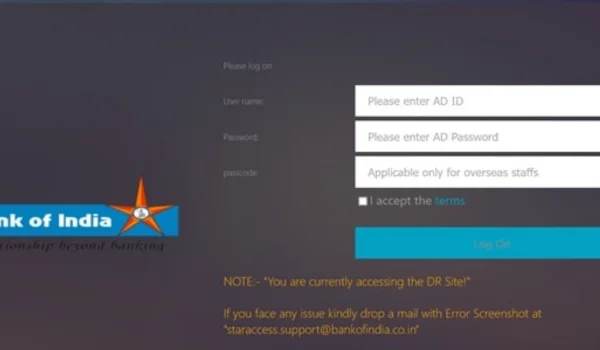
The BOI HRMS (Human Resource Management System) is Bank of India’s official employee self-service portal that allows staff to access a range of HR services online — including payslip downloads, leave management, personal profile updates, and payroll information. This centralised digital platform enables Bank of India employees to manage HR functions easily and securely anytime, anywhere, eliminating paper-based processes and reducing dependency on branch HR offices.
🔗 What Is BOI HRMS?
BOI HRMS is an online HR portal created specifically for Bank of India staff members and managed by the bank’s HR and IT teams. It’s typically powered by Oracle PeopleSoft or similar enterprise HR systems, providing secure access to employee information, payslips, attendance records, leave management, and other HR-related tools.
The portal is reserved for registered employees and can be accessed via a secure login page.
👉 Official BOI HRMS Login Page (Employee ESS):
https://hrms.bankofindia.co.in:6443/psp/HRPROD/?&cmd=login
⚠️ Always use the official URL and avoid third-party or unverified sites to protect your credentials and data.
👥 Who Can Use BOI HRMS?
The HRMS portal is designed for:
✔ Active Bank of India employees
✔ BOI staff registered with the HRMS system
✔ HR administrators and authorised personnel
Access to the portal requires a valid User ID and password issued by the BOI HR team during recruitment or onboarding.
🔐 How to Log In to BOI HRMS – Step by Step
Here’s a clear, easy-to-follow guide to help you log into your BOI HRMS account:
- Open the Official Login Portal
In your web browser (Chrome, Firefox, or Edge), navigate to the BOI HRMS login page:
🔗 https://hrms.bankofindia.co.in:6443/psp/HRPROD/?&cmd=login
- Enter Your Credentials
Once the login page loads:
➡️ Enter your User ID (provided by HR)
➡️ Enter your Password
➡️ Complete any security verification or enter the captcha (if prompted)
⚠️ Ensure you type your credentials carefully — passwords are case-sensitive and should be kept confidential.
- Complete Authentication
After entering your login details:
✔ Click Login
✔ If the system prompts for an OTP (One-Time Password) sent to your registered mobile or email, enter that for verification
Successful authentication will take you to your HRMS dashboard.
🧑💼 Features Available After Login
Once logged in, BOI employees can access a wide range of HR services and self-service tools. The exact menu options may vary by role and access permissions, but typically include:
📄 Payslips & Payroll Details
✔ View and download monthly salary slips
✔ Check deductions, allowances, and earnings
✔ Download payslips in PDF format for tax filing or loan documentation
Employees can often select month and year to view past payslips directly from the portal.
🗓 Leave Management
✔ Apply for different types of leave (casual, earned, sick)
✔ Check your leave balance
✔ View approval status online
This eliminates paperwork and speeds up approval turnaround.
📇 Personal Profile & Records
✔ Update contact information
✔ View employment history
✔ Check posting details, PF information, and designation
Keeping your contact details current ensures you receive HR notifications and OTPs for secure login.
📊 Attendance & Reporting
✔ View your attendance logs
✔ Pull reports required for internal use or audits
This real-time access helps ensure accurate records.
🔁 First-Time Users & Registration
If you have not yet registered for HRMS access, follow these steps (based on common BOI procedures):
- Email your details to the BOI HRMS registration team (like feedback.boialumni@bankofindia.co.in).
- Include your name, date of birth, date of joining, designation, PF number, and a work email address.
- After successful registration, you will receive your User ID and password via email.
If you are a new joiner, your HR team typically sets up your HRMS credentials during onboarding.
🔑 Resetting Password & Troubleshooting
❓ Forgot Password
If you forget your BOI HRMS password:
✔ Use the “Forgot Password” link on the login page (if available)
✔ Provide your employee ID and registered details
✔ Follow the on-screen prompts or email support if needed
If the portal does not provide an online reset option, contact your HR support team or the administrator to reset your password securely
❌ Common Login Issues
| Issue | Solution |
| Incorrect credentials | Re-check User ID and password (ensure case accuracy) |
| Cannot access the portal | Verify you’re using the official URL |
| No OTP received | Ensure your registered mobile/email is up-to-date |
| Account locked after multiple attempts | Contact HR support for unlock |
🔐 Security & Best Practices
To keep your BOI HRMS account secure:
✔ Never share your login credentials
✔ Use strong passwords and change periodically
✔ Always log out after finishing your session
✔ Access the portal from secure devices and networks
✔ Update your registered mobile number for secure OTP delivery
These steps ensure your personal and payroll data stays protected.
📊 Benefits of Using BOI HRMS
The Bank of India HRMS portal empowers employees with:
✅ 24×7 self-service access
✅ Reduced paperwork and faster HR processes
✅ Instant access to payslips and profile data
✅ Improved transparency and accountability
✅ Centralised data for personal and service records
By digitising HR tasks, BOI helps employees focus more on their core work and less on administrative bottlenecks.
📝 Conclusion
The BOI HRMS login portal is a robust and essential platform for Bank of India employees to manage their HR needs online. From payslip downloads and leave applications to attendance tracking and personal info updates, the portal delivers a secure and convenient digital HR experience. To make the most of it, always use the official login URL, safeguard your credentials, and update your contact information for seamless access.