
In the digital era, government-run HRMS ESS (Employee Self Service) portals have revolutionised how employees access their salary information, payslips, leave details, insurance updates, and other HR services online. One such portal is the HRMS ESS portal of the Government of Karnataka, designed to empower state government employees with secure, 24×7 access to their personal HR records and salary payslips.
🔗 What Is HRMS ESS Login?
HRMS ESS (Human Resource Management System – Employee Self Service) is a self-service online platform where employees can log in using their credentials (User ID, Password, and OTP) to:
✔ View and download their salary payslips
✔ Check leave balances and records
✔ Update personal and insurance data
✔ Access Electronic Service Register (ESR) and other HR services
This portal is maintained by the Finance Department, Government of Karnataka, and it replaces traditional manual salary slip distribution with a fully digital approach, making payslip access instantaneous and hassle-free
👉 Official Login URL:
https://hrmsess.karnataka.gov.in/login/loadLoginPage
👤 Who Can Use HRMS ESS Payslip Portal?
The HRMS ESS payslip system is primarily meant for:
✔ Active Government Employees of Karnataka State
✔ Registered users with a valid User ID and registered mobile number
✔ Employees whose details are maintained in the state HRMS database
Before logging in, employees must ensure their profiles and mobile numbers are registered with the DDO (Drawing and Disbursing Officer) or HR administrator so that OTP-based login works correctly.
📌 Why the HRMS ESS Portal Is Important
The portal is not just for payslip access; it also serves as a centralised hub for multiple HR services, such as:
✔ Salary payslip downloads (monthly & year-wise)
✔ Service history and Electronic Service Register (ESR)
✔ Leave details and deduction summaries
✔ Insurance data update for schemes such as PMJJBY & PMSBY
✔ Personal profile maintenance
Karnataka’s finance department has emphasised that all employees register and use the ESS portal to download their own pay slips, leave details, and deduction summaries easily.
🔐 Step-by-Step HRMS ESS Login & Payslip Access
Here’s how you can log into the Karnataka HRMS ESS portal and access your payslip easily:
✅ 1. Open the Official ESS Login Page
Visit the official portal:
🔗 https://hrmsess.karnataka.gov.in/login/loadLoginPage
You can choose between English or Kannada language interface depending on your preference.
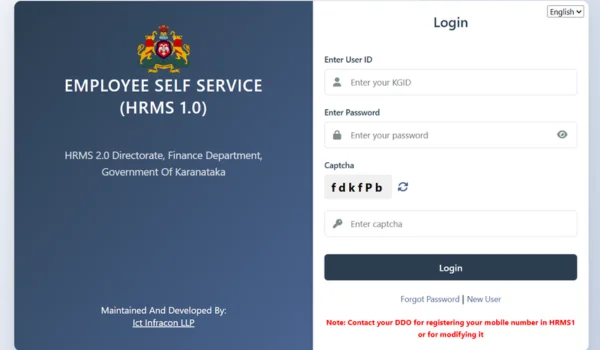
✅ 2. Enter Login Credentials
You’ll see a login form asking for:
- User ID
• Password
• OTP (One-Time-Password) sent to your registered mobile number
• Captcha (if prompted)
➡ If you don’t remember your password, use the “Forgot Password” link to reset it using your registered mobile and OTP.
💡 Tip: If your account has been inactive or deactivated due to inactivity, contact your DDO to reactivate it.
✅ 3. Submit OTP and Login
After entering your User ID and password, you will receive an OTP on your registered mobile — enter it to complete login securely.
🧾 4. Navigate to Payslip/Salary Section
Once logged in:
📌 Go to “My Payslip” or Salary / Payroll section.
📌 Select the month and year of the payslip you want.
📌 Click Download / View to access your payslip in PDF.
The payslip will contain your salary breakdown, allowances, deductions, tax details, and net payout — exactly like a traditional paper payslip but more secure and accessible online.
📊 Payslip Features & Benefits
🧾 What You Can Do on ESS
✔ View monthly payslip details
✔ Download payslips in PDF format
✔ Save or print pay records for loans, proofs, or tax records
✔ View cumulative salary information for the financial year
✔ Keep track of deductions (PF, insurance, taxes)
✔ Check leave encashment or arrears
Modern ESS portals like this help employees self-manage their payroll data without HR intervention, saving time for both staff and HR departments.
📱 Mobile Access with HRMS ESS App (Optional)
The HRMS2 ESS mobile app (available on Android) complements the web portal, allowing employees to:
✔ View/download payslips
✔ Check leave and loan information
✔ View salary balances and other HR services
The app supports access for departments currently onboarded to HRMS2 and makes it easier to access payslip details on the go.
⚠️ Common Login & Payslip Issues
Here are frequently encountered problems and their quick solutions:
❌ Can’t Login?
✔ Ensure you are on the official HRMS ESS URL.
✔ Check your User ID and password carefully.
✔ Use the OTP sent to your registered mobile correctly.
✔ If deactivated due to inactivity, ask your DDO for reactivation
❌ OTP Not Received
✔ Make sure your registered mobile number is current.
✔ Network issues may delay OTP — wait but do not re-enter old OTP.
❌ Can’t Find Payslip
✔ After logging in, navigate to the “Salary / Payroll” section.
✔ Make sure your payroll has been processed for the requested month.
🛡️ Security & Best Practices
To protect your sensitive salary and personal data:
✔ Always use HTTPS and official URLs
✔ Never share your login credentials
✔ Change your password regularly
✔ Log out after each session
✔ Keep your mobile number updated for OTPs
These simple precautions help safeguard your information on the ESS platform
📌 Conclusion
The HRMS ESS login payslip facility is a powerful, user-friendly service offered by the Karnataka Government that lets employees access their salary payslips, leave data, and HR records online — anytime, without needing to visit HR offices. It’s secure, efficient, and helps you manage your payroll information conveniently. Regular use ensures you stay updated with all salary particulars including deductions, allowances, and benefits.