
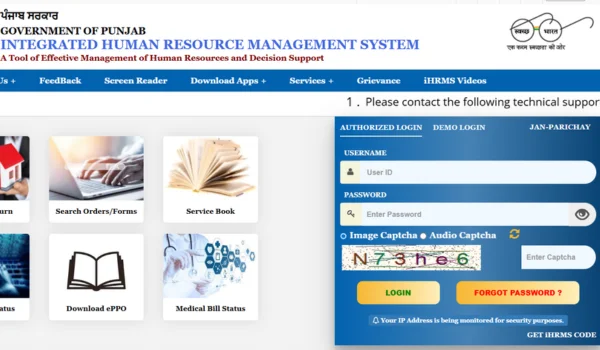
The HRMS Punjab portal is the official Human Resource Management System platform developed by the Government of Punjab to provide a unified online system for its government employees to access key HR services — from employee login and payslip download to leave applications, service records, and more. This system brings transparency, convenience, and digital efficiency to HR processes for employees across departments in the state.
🔗 What Is HRMS Punjab?
HRMS (Human Resource Management System) – Punjab is a web-based portal maintained by the Punjab government in collaboration with the National Informatics Centre (NIC). It is designed exclusively for registered government employees to access HR services online without having to visit HR offices physically.
This portal streamlines the following HR functions:
✔ Salary/payslip access and download
✔ Leave application and status tracking
✔ eService Book and employee details
✔ GPF/GPF details and deductions
✔ Attendance records
✔ Property returns and tax information
✔ Transfer information and service orders
👉 Official Portal URL:
https://hrms.punjab.gov.in/
👤 Who Can Use HRMS Punjab?
The HRMS Punjab portal is intended for:
- Active Punjab Government Employees
- Employees of Punjab Police, Education, Health, and other departments
- Retired employees for retirement services (if applicable)
- Authorized HR administrators and nodal officers
❗ Note
Only registered employees with valid credentials (username/employee code and password) issued by their department can log in. First-time access usually requires setting up or activating credentials through your HR office or designated administrator.
🔐 How to Log In to HRMS Punjab – Step by Step
Here’s a clear and user-friendly guide to help you access your HRMS Punjab account:
- Open the Official Portal
Visit the official HRMS Punjab portal in your web browser:
👉 https://hrms.punjab.gov.in/
Use a modern browser like Google Chrome or Mozilla Firefox for best performance
- Find the Login Section
On the hrms.punjab.gov.in homepage, locate the “Authorised Login” button (often at the top or right corner). Click it to proceed to the login form.
- Enter Your Credentials
Enter the following details on the login page:
- User ID / Employee Code
- Password
- Captcha code (if shown)
➡️ Click Login to access your dashboard.
💡 If you are logging in for the first time, check with your HR/administration team to ensure your credentials are activated and registered correctly.
- OTP & Security (If Applicable)
Depending on portal configuration, you may receive an OTP (One-Time Password) on your registered mobile or email — enter it to complete secure login (if prompted).
🧾 How to Download Your Payslip
Once logged in, follow these steps to access your salary payslips:
- From the Dashboard, go to the Payroll / Salary Section.
- Select Payslip / Monthly Pay Statement.
- Choose the Month and Year you want to view.
- Click View / Download to open the payslip in PDF format.
- Save or print your payslip as needed.
👉 Your payslip contains details such as basic pay, allowances, deductions, tax components, and net salary — useful for personal records, bank loans, tax filing, and verification purposes.
📌 Key Features of HRMS Punjab Portal
The HRMS Punjab portal offers a wide range of useful services for employees:
🧑💼 Employee Self-Service (ESS):
✔ View & download salary slips
✔ Apply & track leave applications
✔ View attendance records
✔ Manage personal details & address updates
📘 eService Book & Records:
✔ Access service history
✔ View transfers & promotions
✔ Maintain pension/retirement data
📊 Financial & HR Data:
✔ GPF / GIS details
✔ Tax deduction summaries
✔ Allowance & loan details
📱 Mobile Access (Optional)
While there’s no widely promoted official mobile app yet, most employees use the portal directly through mobile browsers — enabling them to access payslips, leave applications, and other HR modules on the go
⚠️ Troubleshooting & Common Issues
❌ Login Failure
✔ Ensure correct User ID and password.
✔ Check Caps Lock and keyboard language.
✔ Try clearing browser cache and reloading the portal.
❌ Forgot Password
✔ Click the “Forgot Password” link on the login page.
✔ Enter requested details (Employee Code, DOB, registered email/mobile).
✔ Follow the OTP process to reset your password securely.
❌ Payslip Not Visible
✔ Check that payroll for the selected month is processed.
✔ Use another browser (Chrome/Edge) if necessary.
✔ Contact HR/IT support if technical issues persist.
🛡️ Security & Best Practices
To keep your HRMS Punjab account secure:
- Always use the official URL (hrms.punjab.gov.in).
- Avoid logging in from public or shared devices.
- Don’t share your credentials with anyone.
- Update your registered mobile email for OTP notifications.
- Logout after each session.
📌 Useful Help & Support
For any login or service issues, you can reach out to:
📞 HRMS Punjab Helpdesk (often listed on the portal)
📧 Email support-hrmspb@nic.in (as mentioned on some community guides
📍 Contact your departmental DDO / HR admin
📝 Conclusion
The HRMS Punjab login portal is a powerful tool that provides government employees with instant access to all key HR services — from payslip downloads to leave applications, service records, and GPF details. Its user-friendly design and centralized platform save time and improve transparency, helping staff stay updated with their employment data securely.