
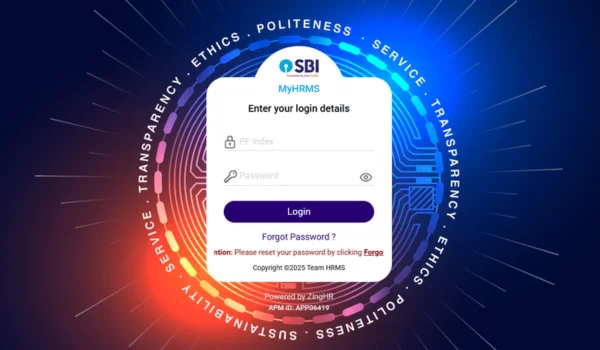
The State Bank of India (SBI) HRMS (Human Resource Management System) portal is the official digital platform for SBI staff, pensioners, and family pensioners to access HR‑related services, salary/pension documents, leave management, and many other self‑service features online. It works as a centralised HR system that replaces manual paperwork and branch‑level requests, offering 24×7 access from anywhere in India.
🔗 What Is SBI HRMS Login Portal?
The SBI HRMS portal is a secure SAP‑based HR platform where SBI employees and eligible retirees can log in using their PF Index (User ID) and password to access their personal HR, payroll, leave, pension, and other employment‑related details online.
This portal has replaced older HRMS login URLs, and SBI now uses updated official domains for better security and ease of access.
🔐 Official SBI HRMS Portal Login Page
📌 Login URL
The official login page for SBI HRMS is:
➡️ https://hrms.sbi.bank.in/2015/pages/authentication/sbihrms.htm
Here you will find the login form that asks for:
- PF Index (User ID)
- Password
- Domain selection (Employee / Pensioner)
- Login button
- Forgot Password? option for new users or password resets
(Note: First‑time users must reset their password by clicking “Forgot Password” before login.)
🧑💼 Who Can Use SBI HRMS?
The HRMS portal is designed for:
- Current SBI Employees
- Download monthly salary slips
- Apply for and track leave applications
- View tax details, PF/Provident Fund info, and Form‑16
- Update contact and personal details
- Access internal circulars and notifications
- SBI Pensioners & Family Pensioners
- View and download pension slips
- Access pension documents and arrear sheets
- Submit Video Life Certificate through MyHRMS app
- Update investment declarations and health policy enrolments
🧠 Step‑by‑Step Login Process
Here’s how to log into the SBI HRMS portal:
Web Login
- Open the official HRMS URL:
https://hrms.sbi.bank.in/2015/pages/authentication/sbihrms.htm - Enter your PF Index (User ID) and Password.
- Select the correct Domain (Employee or Pensioner).
- Click Login and access your HRMS Dashboard.
💡 First time?
If you’re logging in for the first time or have forgotten your password, click Forgot Password, enter your PF Index and registered mobile/email, and reset your password via OTP verification.
📱 Mobile Access – MyHRMS App
SBI also provides a mobile application called MyHRMS available on Android and iOS. You can:
- Log in with same credentials (PF Index + Password)
- Apply or approve leaves
- Submit Video Life Certificate
- Access GEMS grievance redressal
- Update profile information
(The app offers convenient on‑the‑go access alongside the web portal.)
🛠 Key Features of SBI HRMS Portal
Once logged in, users can perform many actions online:
For Employees
✔ View and download salary slips
✔ Access Form‑16 for tax filing
✔ Apply and track leave status
✔ Update personal profile
✔ View PF/Provident Fund and related details
✔ See internal notifications and circulars
✔ Track loan & payroll information
For Pensioners
✔ Download pension slips and arrear sheets
✔ Access pension transaction details
✔ Submit life certificate digitally
✔ Health policy enrolment/renewal
✔ Investment declaration options
⚠️ Common Login Issues & Solutions
| Problem | Solution |
| Can’t access portal | Use official link only (avoid old URLs); check internet connection. |
| Invalid credentials | Select correct domain, re‑check PF Index, reset password via “Forgot Password”. |
| Account locked | Wait 30 mins or contact HRMS support/helpdesk. |
| OTP not received | Ensure registered mobile is active; retry OTP. |
📞 HRMS Helpdesk:
- Toll‑Free: 1800‑425‑3800
- Email: hrms.support@sbi.co.in
🔒 Security & Best Practices
Because HRMS stores sensitive salary and personal information:
✔ Always ensure the URL starts with https://.
✔ Do not share your login credentials.
✔ Logout after each session.
✔ Avoid logging in from public/shared computers.
✔ Change password periodically for security.
❓ FAQs
Q1. What if I still can’t log in?
➡️ Try the “Forgot Password” option or contact HRMS helpdesk for reset support.
Q2. Can I access HRMS without being an SBI employee?
➡️ Only registered SBI employees, pensioners, and family pensioners with valid PF Index can log in.
Q3. Is HRMS separate from SBI Internet Banking?
➡️ Yes. They are two distinct systems; HRMS is for HR services while Internet Banking is for financial transactions.
📌 Conclusion
The SBI HRMS Login portal is a powerful self‑service HR platform that simplifies access to salary, leave, pension, tax, and profile services for SBI employees and pensioners. Using the official link, keeping your credentials secure, and understanding the features will help you manage your HR needs efficiently online.