
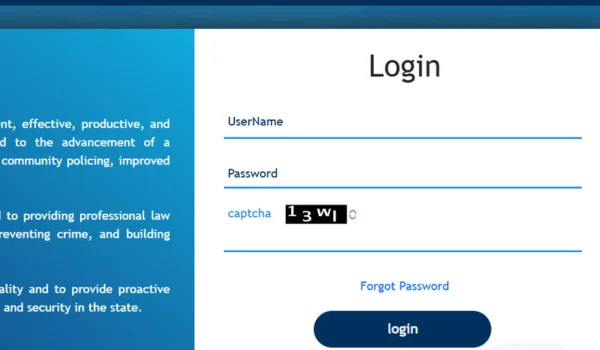
The TS HRMS login portal is a key online platform designed to serve government employees working under the Government of Telangana, particularly for departments such as Telangana State Police and other state government units. This digital Human Resource Management System (HRMS) helps employees access HR services like employee login, payslip download, leave application, service records, and other HR tasks — all in one place and available 24×7.
🔗 What Is TS HRMS?
TS HRMS stands for Telangana State Human Resource Management System, a secure online HR platform designed to centralize HR operations for government employees within the Telangana state. While many departments use tailored HRMS instances, one of the prominent ones is the Telangana Police HRMS portal hosted at tgpolice.cgg.gov.in, developed to automate HR functions for police staff and personnel.
This system is part of a broader push to digitize HR processes — including payroll, leave, personnel records, promotions, and internal orders — to make them faster, easier, and more transparent than traditional manual systems.
📌 Official TS HRMS Login Portal
🔗 Official Login URL:
👉 https://tgpolice.cgg.gov.in/login.action
This Telangana Police HRMS login page serves as the access point for authorized users to log in and manage their HR needs.
👤 Who Can Use TS HRMS?
The HRMS portal is specifically designed for:
✔ Active Telangana Government Employees
✔ Telangana Police Personnel
✔ Departmental administrators and HR officers
✔ Authorized users with valid credentials
Access is restricted to government staff using official login details provided by their department or personnel office.
🔐 Step-by-Step TS HRMS Login Guide
Here’s how users can log into the Telangana HRMS portal easily and securely:
- Open the Official TS HRMS Website
Start by navigating to the HRMS portal in your web browser:
🔗 https://tgpolice.cgg.gov.in/login.action
Use a modern browser like Chrome or Firefox for best performance
- Enter Your Login Credentials
You will see a login form asking for:
- User Name / Employee ID
- Password
- Captcha (if shown on the screen)
➡ Carefully enter your credentials as issued by your departmental HR office.
- Click “Login”
After entering the correct credentials, click the Login button to access your personalized HRMS dashboard
- Forgot Password or Reset
If you forget your password, you can reset it using the Forgot Password link on the same portal screen:
🔗 https://tgpolice.cgg.gov.in/Password/ForgotPassword.action
➡ Enter your registered User ID and follow the steps to verify and reset. OTP or email based verification may be used based on policy.
🧑💼 What You Can Do After Logging In
The TS HRMS system provides a full suite of HR services. Here’s what users can typically access once logged in:
🔹 Employee HR Dashboard
A centralized view of your personal profile, contact information, job status, and service history.
🔹 Payslip & Payroll Management
✔ Download monthly payslips
✔ View earning details, deductions, and allowances
✔ Keep a record of past payslips for financial planning
This functionality ensures employees have instant access to salary details — no more waiting for printed statements.
🔹 Leave & Attendance System
Employees can:
✔ Apply for various types of leave online
✔ View leave balances
✔ Track leave approvals and history
This simplifies leave requests and helps planning without manual visits to HR.
🔹 Official Orders & Documents
Users can generate and access internal orders, duty assignments, departmental memos, promotions, and transfer orders generated through the portal.
🔹 Performance & HR Records
‚ Check performance records
‚ Monitor appraisal history
‚ View service books and HR updates online
These tools help employees manage and review their career progression efficiently
📱 Mobile & Remote Access
Although there isn’t a widely publicized official mobile app for TS HRMS at the moment, employees can access the portal via mobile browsers. This allows users to view payslips, apply for leave, and manage HR tasks on the go as securely as on a desktop.
⚠️ Common Login Issues & Solutions
❌ Login Failures
✔ Ensure the URL is correct (avoid unofficial mirrors)
✔ Check credentials carefully (case-sensitive)
✔ Clear browser cache or try a different browser
❌ Cannot Reset Password
✔ Use the Forgot Password link and follow OTP/email verification
✔ Contact your HR administrator if your registered contact details are outdated
❌ Account Locked
Too many failed attempts may lock your account temporarily — contact the HR support team to restore access.
🛡️ Best Practices for Security
✔ Always use the official TG Police HRMS URL
✔ Avoid logging in from public/shared computers
✔ Update your mobile/email with HR for OTPs
✔ Logout after every session
✔ Use strong, unique passwords and change periodically
These practices help protect your sensitive payroll and personnel data.
📌 Why TS HRMS Matters
The Telangana HRMS system brings significant value to government employees by:
✔ Replacing manual HR processes with digital workflows
✔ Reducing administrative delays
✔ Increasing transparency across payroll and leave systems
✔ Giving employees control over their personal HR data
✔ Supporting modern, efficient government HR service delivery
📝 Conclusion
The TS HRMS login portal is an essential digital tool for Telangana government employees — especially police personnel — to efficiently manage human resource tasks online. From payslip downloads and leave applications to service records and internal orders, the HRMS platform makes HR services accessible, transparent, and user-friendly. Always use the official URLs, keep your credentials secure, and reach out to HR support if you face challenges.