
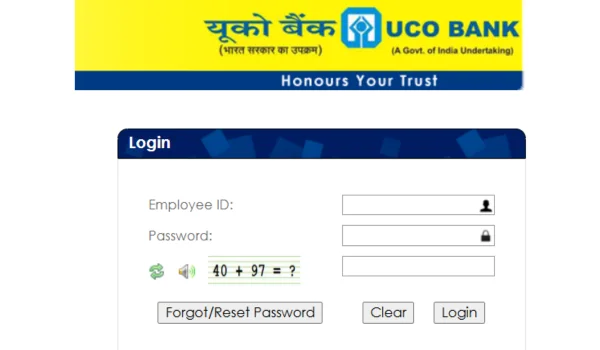
The UCO HRMS (Human Resource Management System) is UCO Bank’s official online platform that empowers employees and pensioners to access essential HR services anytime, anywhere. Whether it’s viewing salary details, applying for leave, checking personal information, or downloading important documents, the HRMS portal simplifies HR tasks with secure online access — eliminating the need for frequent visits to HR departments.
📌 What Is UCO HRMS?
UCO HRMS is a centralized Human Resource Management System designed especially for UCO Bank staff (in‑service & retired). It serves as an employee self‑service portal where users can log in using credentials provided by the bank’s HR team. This system streamlines HR operations such as payroll management, leave processing, and profile updates, boosting productivity and transparency.
🔗 Official UCO HRMS Login Portal
👉 The official HRMS login page for UCO Bank employees is:
https://hrms.ucoonline.in/login.action — Use this URL only to avoid phishing or fake sites.
This portal is accessible via desktops, laptops, and mobile browsers.
👩💼 Who Can Access UCO HRMS?
The HRMS portal is available for:
✔ Current UCO Bank employees
✔ Retired employees & pensioners
✔ HR administrators and authorized officials
Only users with valid HRMS credentials (User ID and password) provided by the HR department can log in.
🔐 Step‑by‑Step UCO HRMS Login Process
Here’s a detailed, user‑friendly guide to logging in:
- Open the Official Portal
Go to:
➡️ https://hrms.ucoonline.in/login.action
Use a modern browser like Chrome, Firefox, or Edge for best results.
- Enter Your Credentials
You will see the login page asking for:
- User ID (given by HR)
- Password
- Captcha code (if shown)
➡ Enter all details correctly.
- Click “Login”
After entering your details, click the Login button to access your dashboard. Once verified, you will land on your HRMS home screen, where all services are listed.
- Forgot Password / Reset
If you forget your password:
- Click Forgot/Reset Password (if option available).
- Enter your User ID and follow the OTP (One‑Time Password) process sent to your registered mobile number/email.
- Create a new password and then log in with updated credentials.
If you still face issues, contact your branch HR office for support.
📊 Key Features of UCO HRMS
Once logged in, a wide range of HR services are available:
- Payroll Management
✔ View and download salary slips, year‑end statements, tax details, and Form‑16.
✔ Track allowances, deductions, and payroll data securely.
- Leave Management
✔ Apply for leaves online.
✔ Check leave balance and history.
✔ Track leave approval status.
- Profile & Personal Data
✔ View/update personal information such as contact details, emergency contacts, etc.
✔ Ensures your profile is up‑to‑date with HR records.
- Employee Self‑Service (ESS)
✔ Self‑update info without visiting HR.
✔ Raise issues, get announcements, and access resources.
- Additional Modules
Depending on bank configuration, you may access:
✔ Reimbursement claims
✔ Holiday Home bookings
✔ Tour and travel data
✔ Contacts directory
✔ Department announcements
📱 UCO HRMS+ Mobile App (Optional)
UCO Bank also has a UCO HRMS+ mobile app, which brings many services into the palm of your hand — especially useful for:
- Viewing salary info
- Leave and reimbursement
- Employee announcements
- Pensioner details
- Holiday home requests
- And more features beneficial for employees and retirees alike.
📍 The app is available on Google Play Store and Apple App Store
💡 Benefits of Using UCO HRMS
The platform brings several advantages:
✔ 24×7 access to HR services without paperwork.
✔ Time saving: No need to visit HR offices for basic services.
✔ Transparency: Clear access to payroll and leave data.
✔ Empowerment: Employees can self‑serve most HR needs.
✔ Secure data access: Strict login required.
⚠️ Security & Best Practices
To protect your account:
✔ Always use the official HRMS URL — avoid imitations.
✔ Do not share your login credentials with anyone.
✔ Change your password periodically.
✔ Logout after each session.
✔ Keep your registered mobile number/email updated for OTPs.
📌 Troubleshooting Common Login Issues
Problem: Unable to login
Solution:
✔ Check username/password for typos.
✔ Ensure CAPTCHA is entered correctly.
✔ Clear browser cache and try again.
✔ Reset password if needed.
✔ Contact HRMS support via HR department.
Problem: Forgot password
Solution:
Follow the Forgot Password process or contact HR for help.
❓ FAQs
Q1. Who can access UCO HRMS?
➡ Only authorized UCO Bank employees and retirees with valid credentials.
Q2. What if I didn’t receive HRMS login details?
➡ Contact your branch HR Admin or Zonal HR Office.
Q3. Can I download my salary slip anytime?
➡ Yes, HRMS allows payslip downloads for current and previous months.
Q4. Is there a mobile app?
➡ Yes — the UCO HRMS+ app offers many features for employees and pensioners.
📝 Conclusion
The UCO HRMS login portal is an essential digital tool for UCO Bank’s workforce and retirees — bringing essential HR services into one secure online platform. Its self‑service design saves time and drives efficiency, helping users manage leave, salary, and personal data effortlessly. Accessing it through the official login ensures safety and convenience in daily HR tasks.